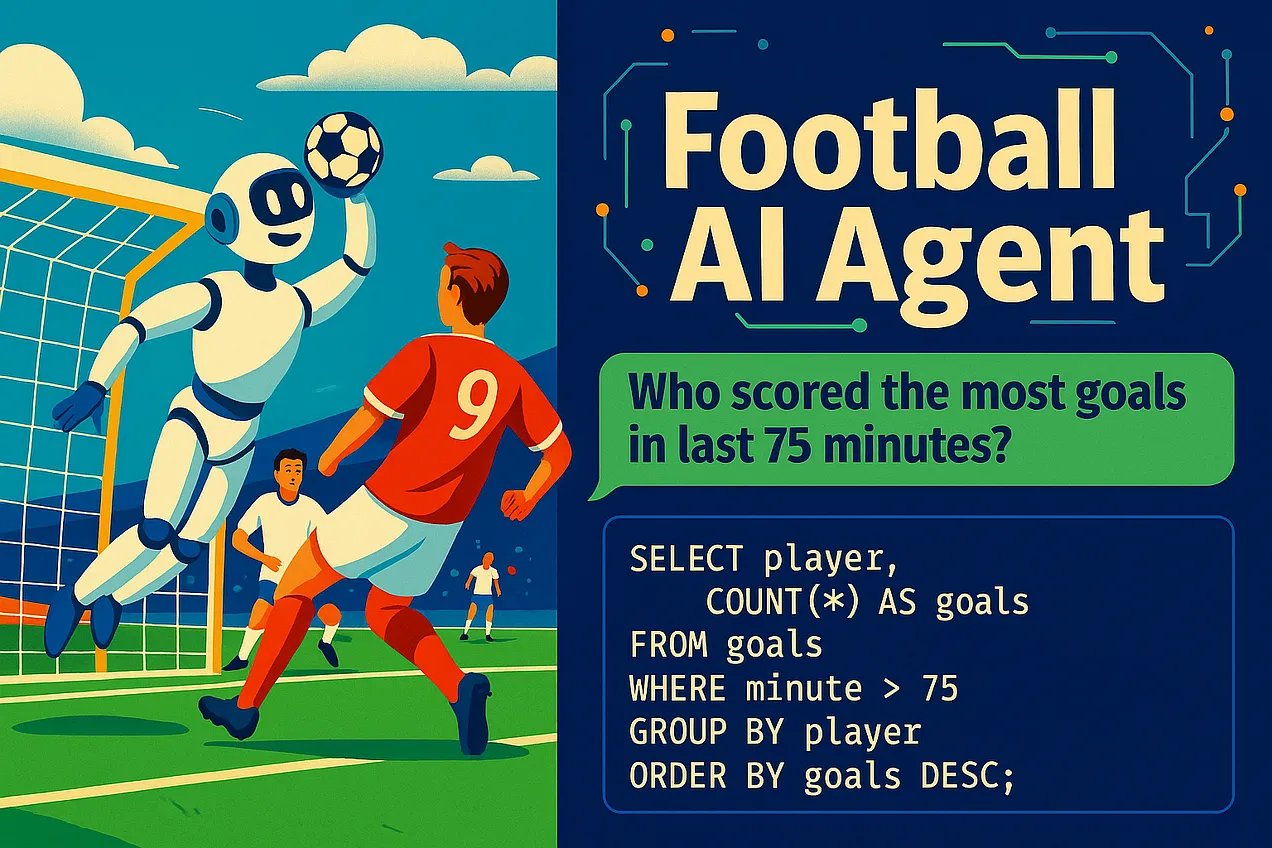
Will humans play robots in the future? We don’t know yet. (Credits: OpenAI)
Lately, I’ve seen a flood of AI agent demos — most of them either overhyped web crawlers or variations of the classic RAG (retrieval-augmented generation) approach. Since I hadn’t built a proper “agent” myself yet, I decided to pick a weekend project that felt like a solid real-world use case: a football question & answer bot. The idea was to start with the Bundesliga and expand to lower leagues like Regionalliga Nord and Bezirksliga Weser-Ems. I also wanted to explore the limits of current tools like LangChain and LangGraph — and see where these frameworks shine, and where they fall short.
The idea was simple: what if you could ask natural language questions about match results, scorers, or even long-term trends — and get accurate answers, not from a human expert, but from a system that actually understands the data?
The full code is available on GitHub: github.com/dpleus/football-bot [1]
Step 1: Start With a Solid Test Dataset
One of the main challenges with a football bot is that people can ask just about anything. I did a quick brainstorming session to map out the types of questions users might expect — and came up with a wide range, each requiring different kinds of data. And that was just scratching the surface. I didn’t even touch on things like upcoming fixtures, transfers (and rumors), historical records, and probably much more.
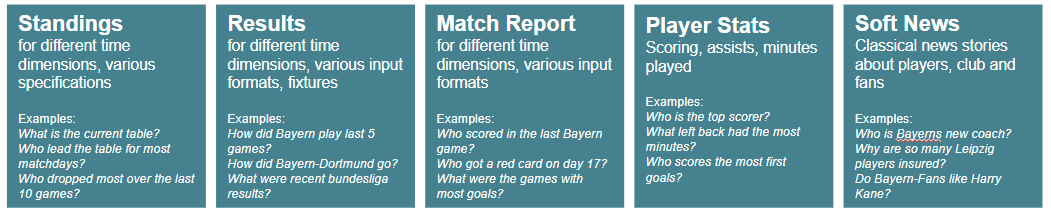
My quick brainstorming
So, before jumping into building anything, I created a test dataset of 20 diverse football questions — ranging from simple match results to more complex stats aggregation.
These questions are highly subjective and tailored to my use case — designed to simulate the kinds of queries I wish current tools could handle well.
What’s the current Bundesliga table?
Who won the match between Dortmund and Bayern in the first half of the season?
How did Bayer Leverkusen play last weekend?
Who is the top scorer in the Bundesliga this season?
What was the result of the RB Leipzig vs. Union Berlin match?
How many points does VfB Stuttgart have right now?
Who scored for Eintracht Frankfurt in their last match?
Which goalkeeper has the most clean sheets this season?
What are the highlights from the Werder Bremen vs. SC Freiburg match?
How many goals has Harry Kane scored since the winter break?
What was the result of the first match between Mainz and Hoffenheim this season?
How did Borussia Mönchengladbach perform in the last three matches?
Which players were suspended on matchday 27?
What was the biggest win in the Bundesliga in March 2025?
What’s the head-to-head record between Augsburg and Köln in the last five years?
Which team improved the most in the table between matchday 1 and matchday 20?
Has Bayern Munich changed their coach since February 2025?
Who had the most assists among midfielders?
Which team collected the most points against the current top 5 teams?
Which Bundesliga team has the best goal difference away from home this season?
Step 2: Benchmarking the Baselines (Accuracy)
I tested this dataset using ChatGPT and Perplexity — both of which rely on web-search-based approaches. That means they fetch snippets from search engines, scrape websites, and try to summarize the results. I didn’t just do this for the Bundesliga — I also adapted the questions for Regionalliga Nord (4th tier) and Bezirksliga Weser-Ems 3 (7th tier) to see how well these tools handle lower-league data.
The results (scored manually) show their accuracy across leagues:
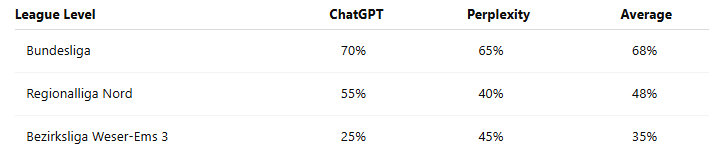
Bundesliga results were decent — search engines are flooded with high-quality content. You’ll often find articles written specifically with SEO in mind, like “These players were suspended on matchday 17.” That kind of content is perfect for web-search-based bots. But as soon as you move down to Regionalliga or Bezirksliga, web search starts to fall apart. The data is still out there, but it’s buried in tables or hidden inside JavaScript-heavy websites that are hard to index and even harder to parse.
Step 3: Building the Agent
My initial idea was to build an agent that uses the free OpenLigaDB API [2] (great project, by the way!). But I quickly realized — and this turned out to be one of the most important Heureka moments — that their APIs (and I guess this also applies to most other APIs out there) are far too inflexible for what I wanted this bot to do.
For example:
If I want to calculate the league table for a previous matchday, I have to fetch all matches and compute it manually.
If I want to search for a game by team name, I first need to retrieve the team IDs, then make two more API calls to get the game details.
And those are just two examples. There are many more cases where answering a seemingly simple question would require a complicated chain of API calls.
So that led me to this basic setup:
Structured Data Access: SQLite database (see next section)
Tools:
SQL querying via LangChain’s SQL agent
Web search fallback (via
gpt-4o-search-preview)Plotting (matplotlib, Streamlit)
Language Model: GPT-4 (temperature 0)
I used LangChain to integrate tool usage and initially built on LangGraph’s pre-built ReAct agent. The ReAct framework (short for Reasoning + Acting) combines two steps in an agent's thinking: first, the model reasons about what it needs to do, then it acts by calling a tool — like a database query, a web search, or a calculator. The agent repeats this cycle until it has enough information to answer the question. This allows it to break down complex tasks into manageable steps, rather than trying to solve everything in one go. As I understand, its not entirely ReAct in LangChain/Graph since the Reasoning is ommited. But more info is here: LangGraph ReAct Agent.
That points me to a general observation. While LangChain/Graph is powerful, I found its abstractions a bit hard to understand. At the end of the day, tool use just comes down to API calls — but understanding why the agent chose one tool over another was surprisingly opaque. I was hoping for more fine-grained control, but often felt boxed in by patterns I didn’t fully trust.
What really helped was using LangSmith. It’s a lightweight tool for storing questions and tracking the full response chain. The Playground feature — where you can tweak the system prompt and test variations — was especially useful for debugging.

LangGraph
Building the Database
I extracted match and goal data from OpenLigaDB for the Bundesliga. For the lower divisions, it would’ve taken more time to gather the data, so I focused on top-tier matches first. I created three core tables:
matches: Matchday, teams, date, resultgoals: Scorers, timing, goal contextstandings: Full table snapshot for every matchday (precomputed).
Initially, I tried calculating the standings from match results on the fly — but that quickly turned out to be too slow. Precomputing and caching the standings for each matchday made querying much faster and gave the agent that “instant response” feeling. Like in many software projects, getting the data model right was critical — and even more so here. One small but important issue was inconsistent player names (e.g., "H. Kane" vs. "Harry Kane"). To handle that, I added a scorer mapping layer to unify names.
In the end, I packaged everything into a local SQLite database, which made integration simple.
Cool Examples of Agent Reasoning
I noticed relativley quickly that theree where examples where structured data really shines:

Screenshot of the streamlit ui
"Who scored the most goals after minute 75?"
"Who scores the most leading goals?"
One SQL query, no scraping needed.
Another layer deeper:
"Which team collected the most points against the current top 5 teams?"
This is incredibly hard for a generic RAG system, but trivial with structured access:
Identify the current top 5
Join standings + matches
Aggregate points in subset
The agentic capabilities turned out to be one of the most interesting aspects of the project. Since I used the ReAct framework, the agent decides on its own which tools to use — allowing it to combine structured data and web search in surprisingly effective ways.
"How often did Harry Kane score since the winter break, and what does his coach say about him?"
The agent:
Queries the goal table (applies a date filter)
Triggers a fallback web search for coach quotes
Merges both in a human-readable reply
Evaluation Results
Afterwards, I tested how well my agent performed on the Bundesliga question set. On the full test set, it reached 90% accuracy — compared to 70% for OpenAI’s default tools. The breakdown looked like this:
70% from structured SQL queries
20% from fallback web search
10% failed due to tool misuse or query ambiguity
Compared to RAG-based systems, the structured approach proved far better — especially for questions that required precise logic or multi-step reasoning.
That said, it wasn’t all smooth sailing. One of the biggest challenges was ensuring the agent’s reliability. Sometimes it would make unexpectedly dumb decisions, like:
Choosing the web-search tool even when the system prompt clearly instructed it to use table data
Interpreting “How did Leverkusen play on the last matchday?” as “matchday 34,” regardless of the actual season progress
Ignoring instructions to match player names by lowercased surnames when answering “How many goals did Harry Kane score?”
There were several cases like these, and it took a lot of trial and error to get the system prompt and tool descriptions just right. I definitely ended up overfitting to the test set a bit — tweaking things until the bot could reliably answer those specific questions.
What I Learned
Building agents is still a lot of work. When LinkedIn influencers or no-code tools promise simple, one-click agents — don’t buy the hype. Complex problems usually require complex engineering.
LLMs are great at reasoning with structured data. Using the LLM to translate a query into SQL enables a lot of flexiblity if your data is well-structured and documented. That being said, my example had little complexity and also there comes another security aspect with using databases as sources for agents.
Data quality is crucial. The “boring” stuff — designing proper data models, normalizing names, precomputing results, writing clear documentation — has a huge impact. Small decisions in data structure can drastically affect performance.
Don’t trust agents blindly. They’ll do random things from time to time — and that’s by design. If they always did exactly what you expect, they’d just be static workflows. You can reduce the failure rate, but you should always expect some weird behavior.
LangChain and LangGraph are powerful but abstract. Debugging tool selection was more difficult than I expected. You’ll definitely want to use something like LangSmith (or another observability layer) to track what’s going on.
There’s real potential for data holders. Some questions are simply better answered with structured data than via web search. If you’ve been exposing your data only through websites or dashboards, consider what you could enable by opening it up to agent-based interfaces — your users could get far more value.